
When a hero's report arrives, do not judge by the reply text alone. Look at the actual code changes. Look at the changes (review) on the quest card opens the view for that.
Open the review#
When a report arrives, the Next box says a report has arrived and asks you to look at the changes. Select Look at the changes (review).
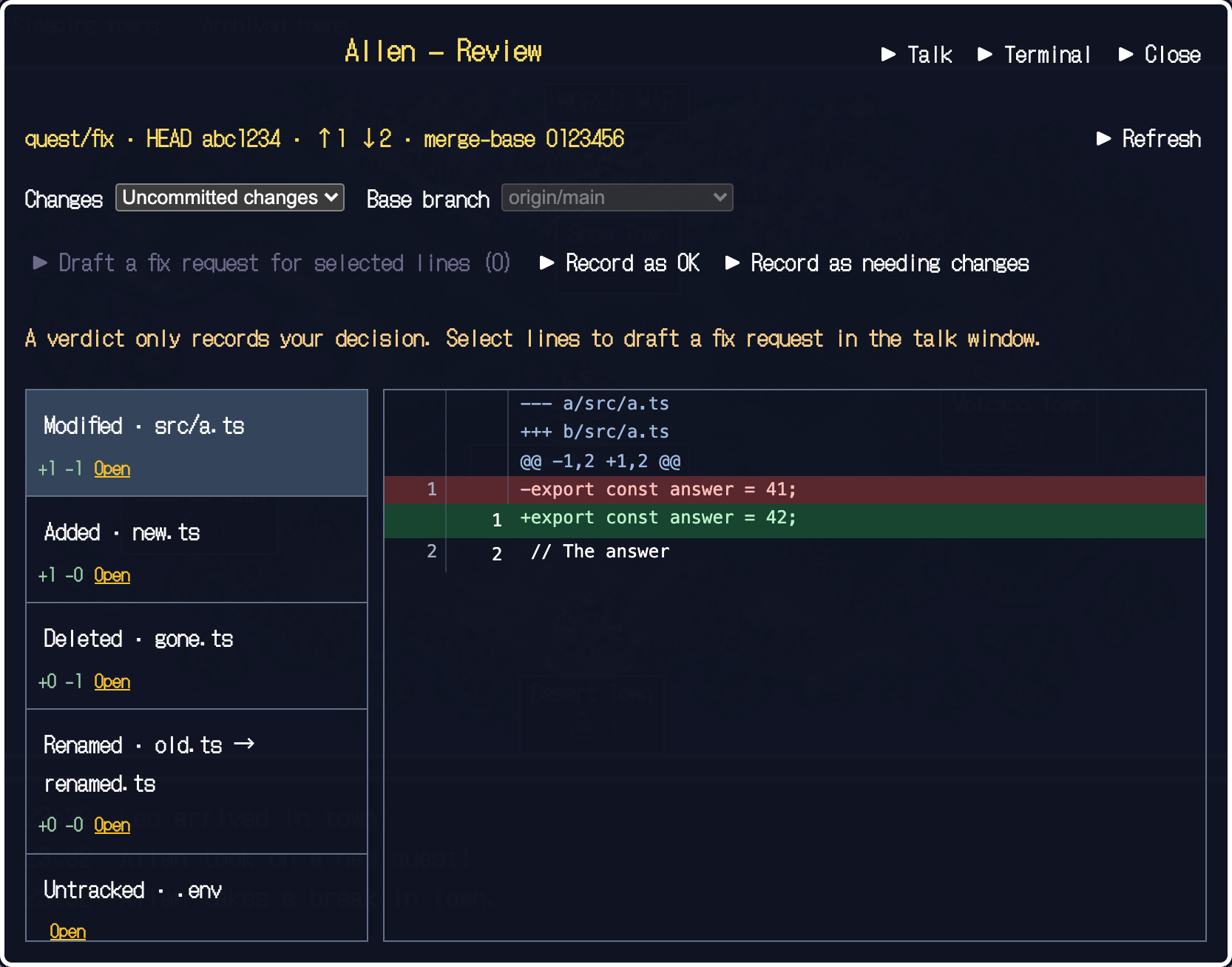
- Check the range being compared
Choose uncommitted changes or the whole branch. For the whole branch, check what it is compared against.
- Pick a file on the left
See whether it was added, changed or deleted, and how many lines moved.
- Read the change on the right
Red is removed, green is added. If something needs fixing, use "Needs changes" in the review or "Ask for another try" on the card.
The verification marks#
The marks under the card show results against your acceptance checks. They are based on run results and work state delivered by hooks, and they distinguish five states.
| Mark | Meaning |
|---|---|
| Not run | Not run yet |
| Passed | Ran and passed |
| Failed | Ran and failed |
| Changed since | The code changed after the check, so the result may be stale |
| Unknown | The result could not be obtained or judged |
Registering a check does not run the command. Complex commands and results that cannot be obtained show as Unknown. With Codex hooks, no automatic verification evidence is produced.
When you are satisfied, move on to Adopt the result.