
Proof of concept · Open source (MIT)
Turn boring workinto an adventure.
Watch Claude Code and Codex from a pixel-art RPG town. Sessions become heroes, projects become towns, and tests become monster fights.
macOS / Linux · Node.js 22.13+ · No install needed
DEV LOOP
Your dev loop,
now an adventure.
Hand off, watch, verify, receive.
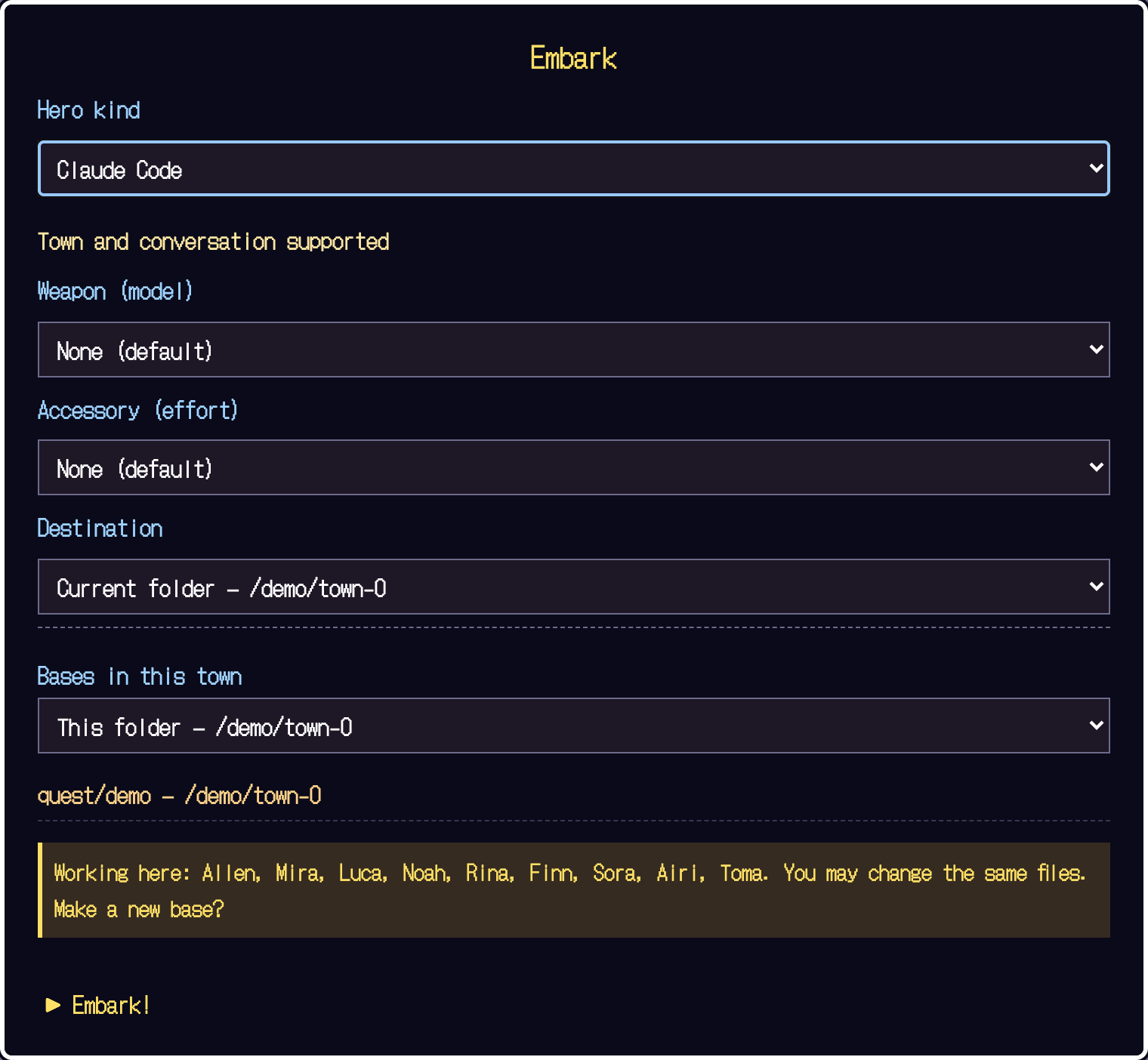
Send heroes to your town.
Pick a logged-in CLI, choose the folder to work in, and press Embark. Each project gets a town, and each session shows up as a hero.
- Works with Claude Code, pi and Codex
- Worktrees of the same repo share one town
- Never rewrites your personal CLI config files
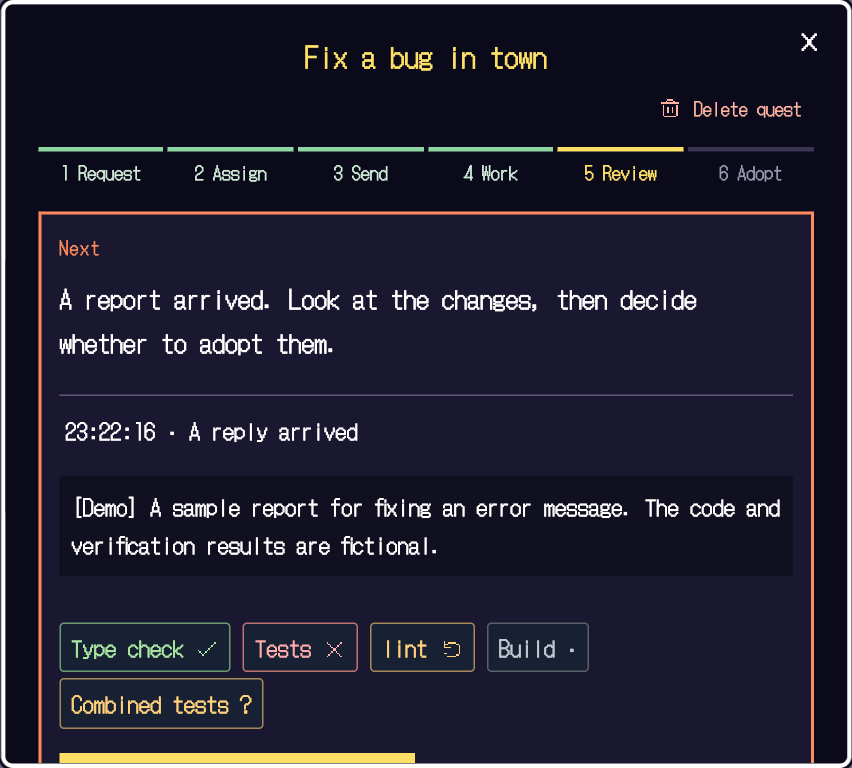
Six stages, always in view.
Request → Assign → Instruct → Work → Review the report → Adopt. A bar on each card shows where you are, and "Next step" is always there. It is a work ledger that outlives the session.
- Title, purpose, owner and checks, all in one place
- Choosing an owner never sends the instruction automatically
- You check the draft with your own eyes before it is sent
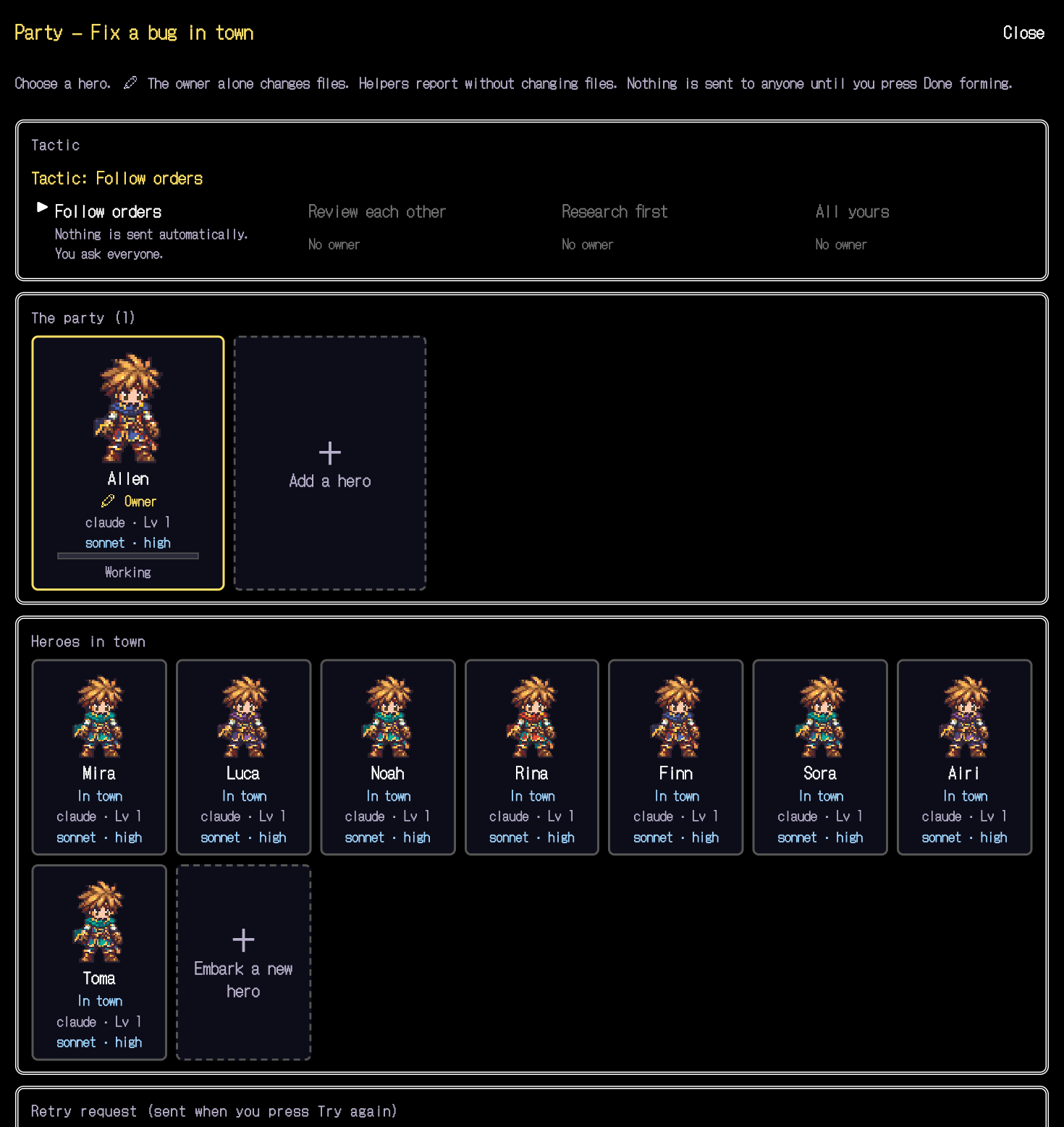
Big jobs, big party.
In the party window, add heroes from the town, pick who writes the changes, and choose a tactic: "Follow orders", "Review each other", "Research first" or "All yours". The allies here are separate CLI heroes you started yourself — not the subagents (Warrior, Thief…) in the roster.
- Only the owner rewrites files
- Helpers handle research and reports
- Nothing is sent to anyone until you press "Done forming…"
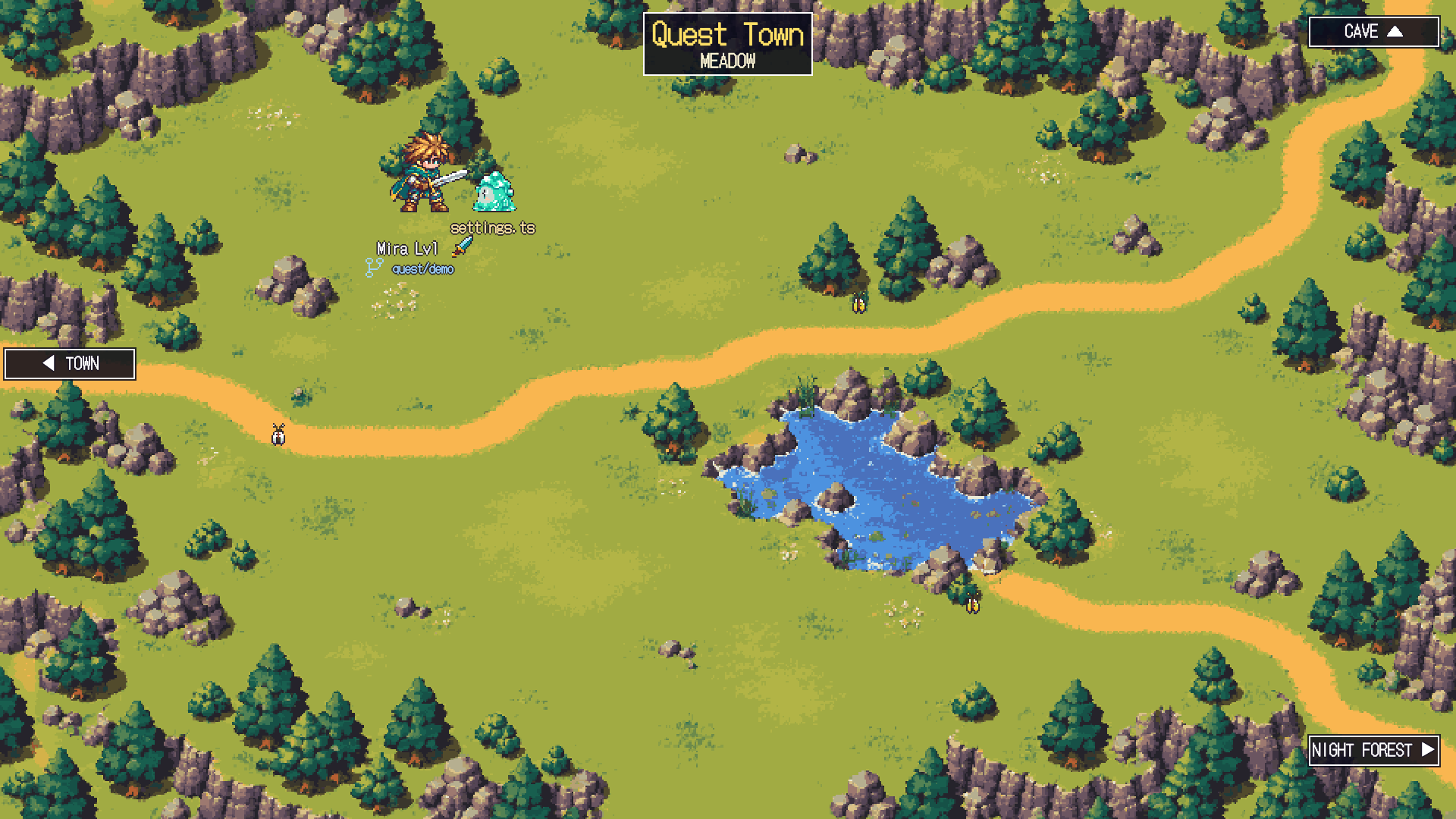
Work changes the scenery.
Edits happen in the meadow, tests in the cave, commands in the night forest. You can tell what a hero is doing at a glance, from its pose and the scenery. A failure becomes the enemy's counterattack.
- Lv, HP and MP come from finished work, recent failures and remaining conversation
- Subagents join as allies
- Naps at the inn, conversation tidying at the church
Check the diff, not just the report.
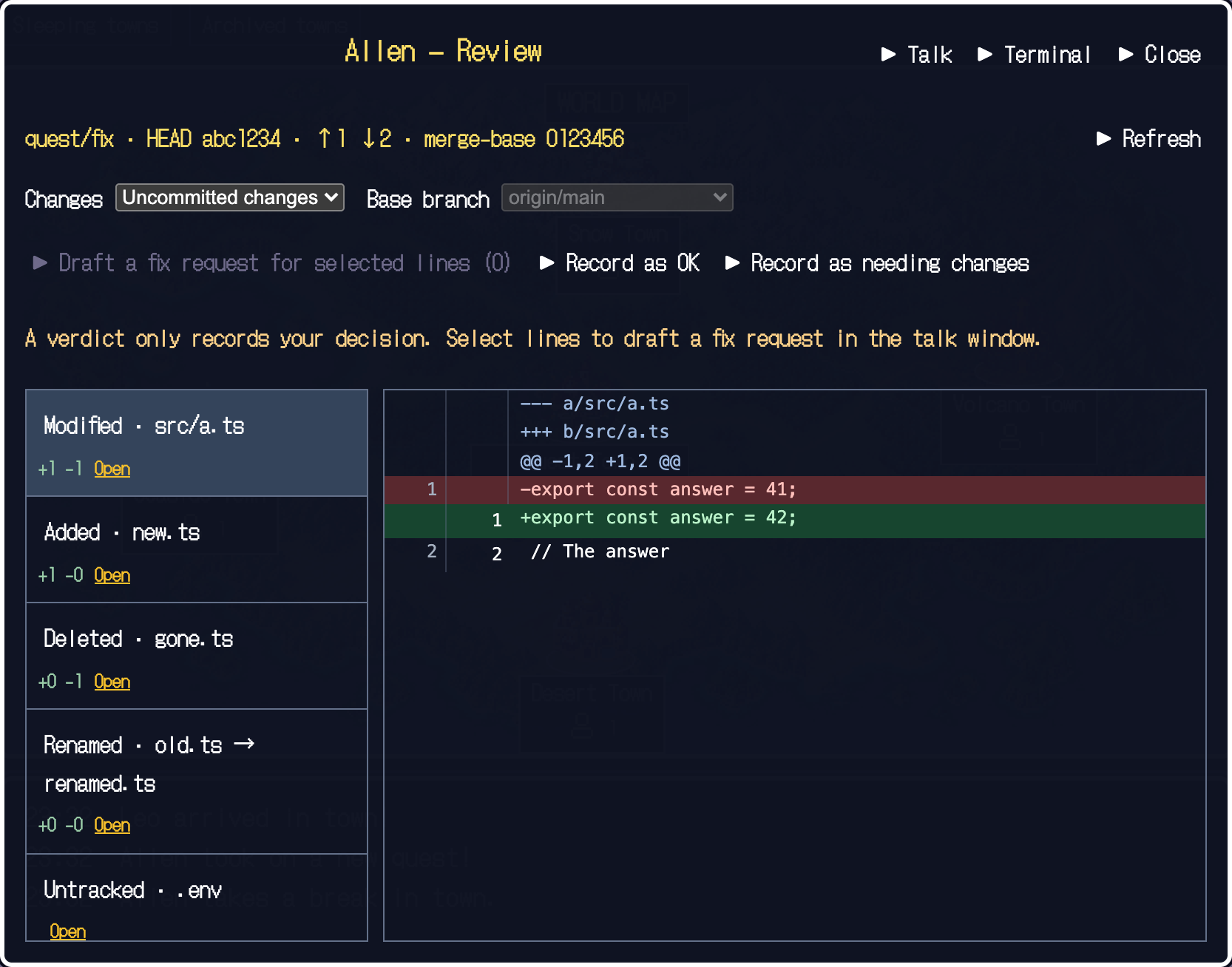
"Appraise" lets you read the Git diff. Red is removed, green is added. Don't just trust a reply — decide by looking at the real code changes.
- Compare uncommitted changes or the whole branch
- See additions and deletions per file
- Send fix requests with "Record as needing changes"
Adopt on evidence, or redo.
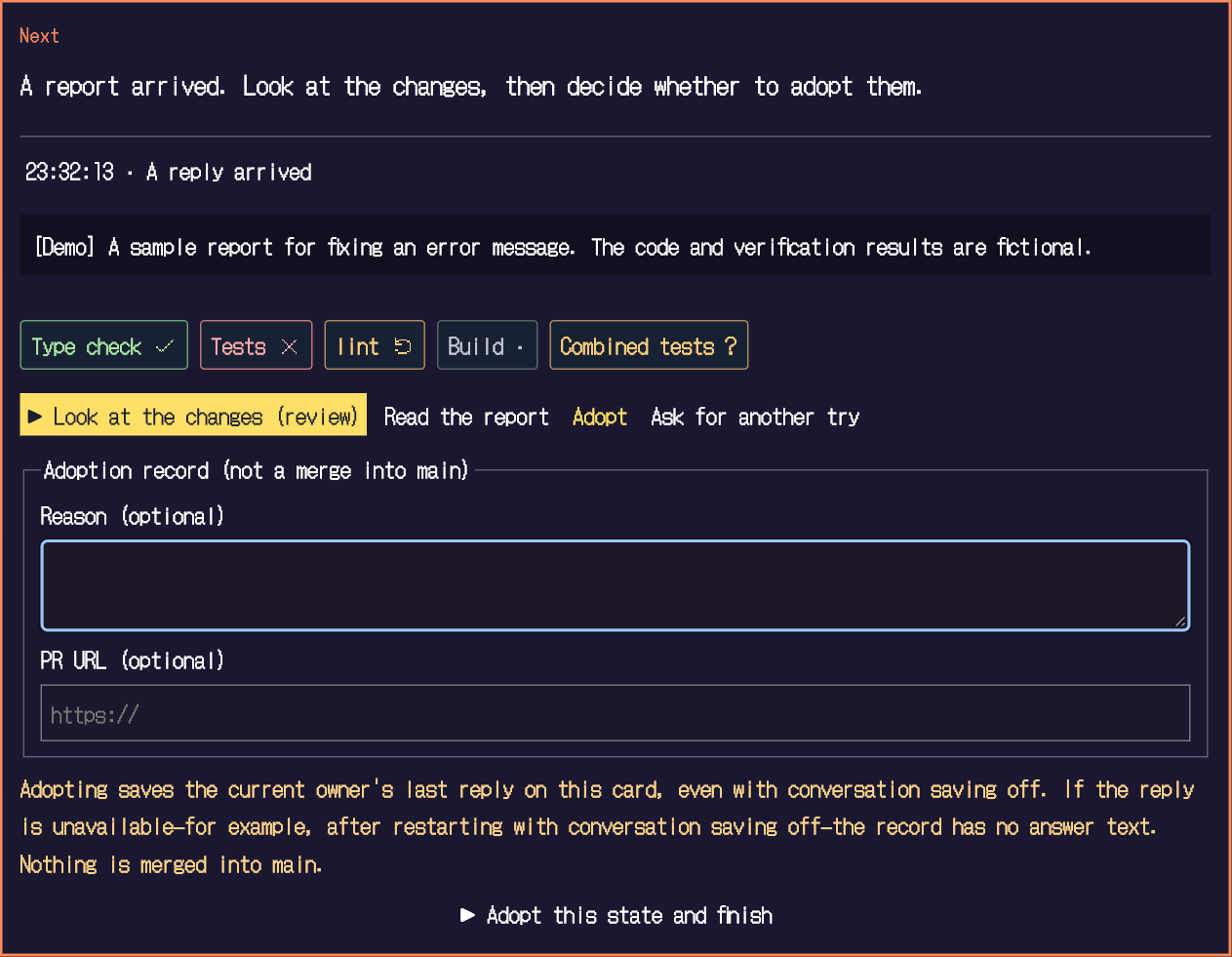
Type check, tests and lint marks tell "passed", "failed", "stale", "not run" and "unknown" apart. A pass is never assumed. Whether to adopt or ask for another try is your call.
- A redo sends a new instruction and the hero works again
- Never merges, pushes or opens a PR automatically
- Never auto-approves permissions either
BRING YOUR OWN AGENT
Works with the CLI you use.
Yushario doesn't replace your agent. It launches your logged-in CLI and welcomes it into town as a hero.
- Claude CodeTown, heroes, terminal
Supports permission prompts.
- piTown, heroes, terminal
Loads the extension automatically on launch. Some conditions apply.
- CodexTown, heroes, terminal (limited)
Check /hooks and send the first request from the terminal.
- shellTerminal only
It does not become a hero; use it as an embedded terminal.
Hooks are attached only to agents launched from Yushario. For what is supported, see Guide.
TRANSLATION
Make invisible work visible.
Terminal events, retold as RPG.
- An agent session
- Hero
- A project or repository
- Town
- Editing, tests, commands
- A monster fight
- Subagent
- An ally who fights with you
- Several agents sharing work
- Party formation and tactics
- A job (task)
- A quest (six-stage card)
- A report of finished work
- Treasure chest
- Idle, conversation tidying
- Rest at the inn, pray at the church
WORLD
Work becomes scenery.
Click an image to open that scene in the demo.
See it in the demo ↗Editing filesMeadow
Fixing code becomes a bright meadow fight. You can even see which file a hero is working on.
 See it in the demo ↗Tests and type checks
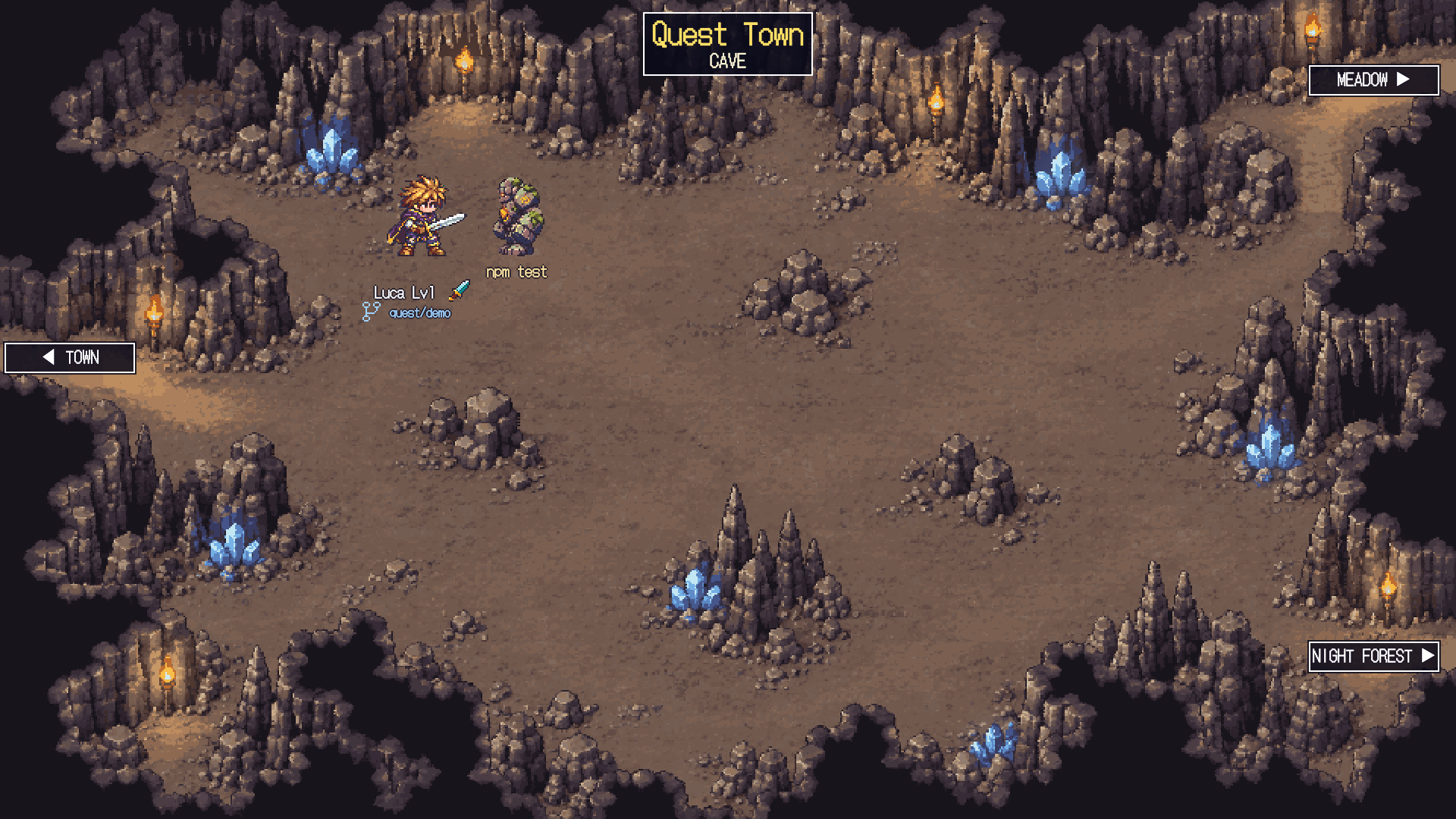
Cave
Verifying work takes place in a torch-lit cave, facing rock monsters.
 See it in the demo ↗Running commands
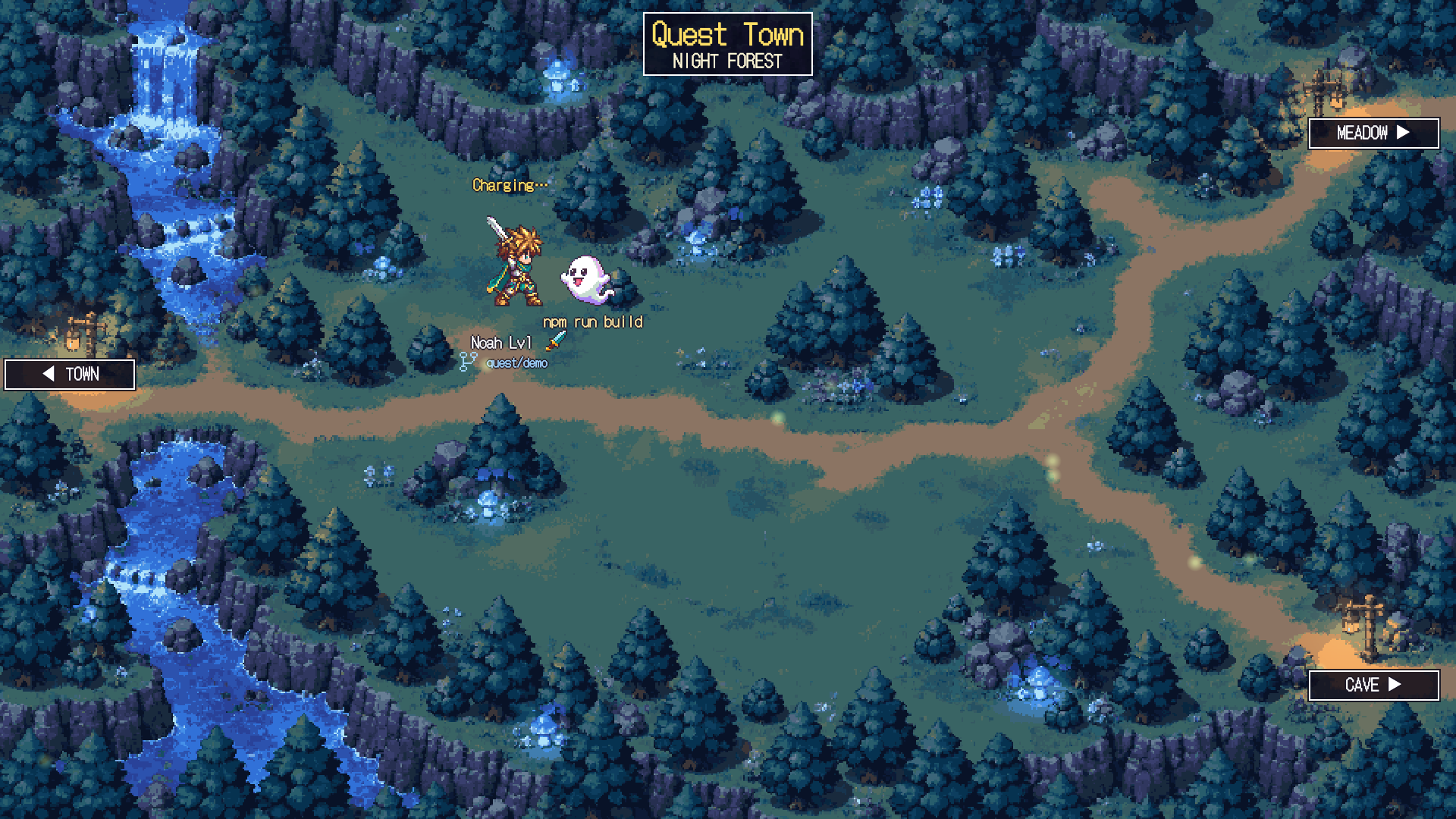
Night forest
Builds and other runs happen in a quiet night forest, where you fight ghosts beside glowing mushrooms and a waterfall.
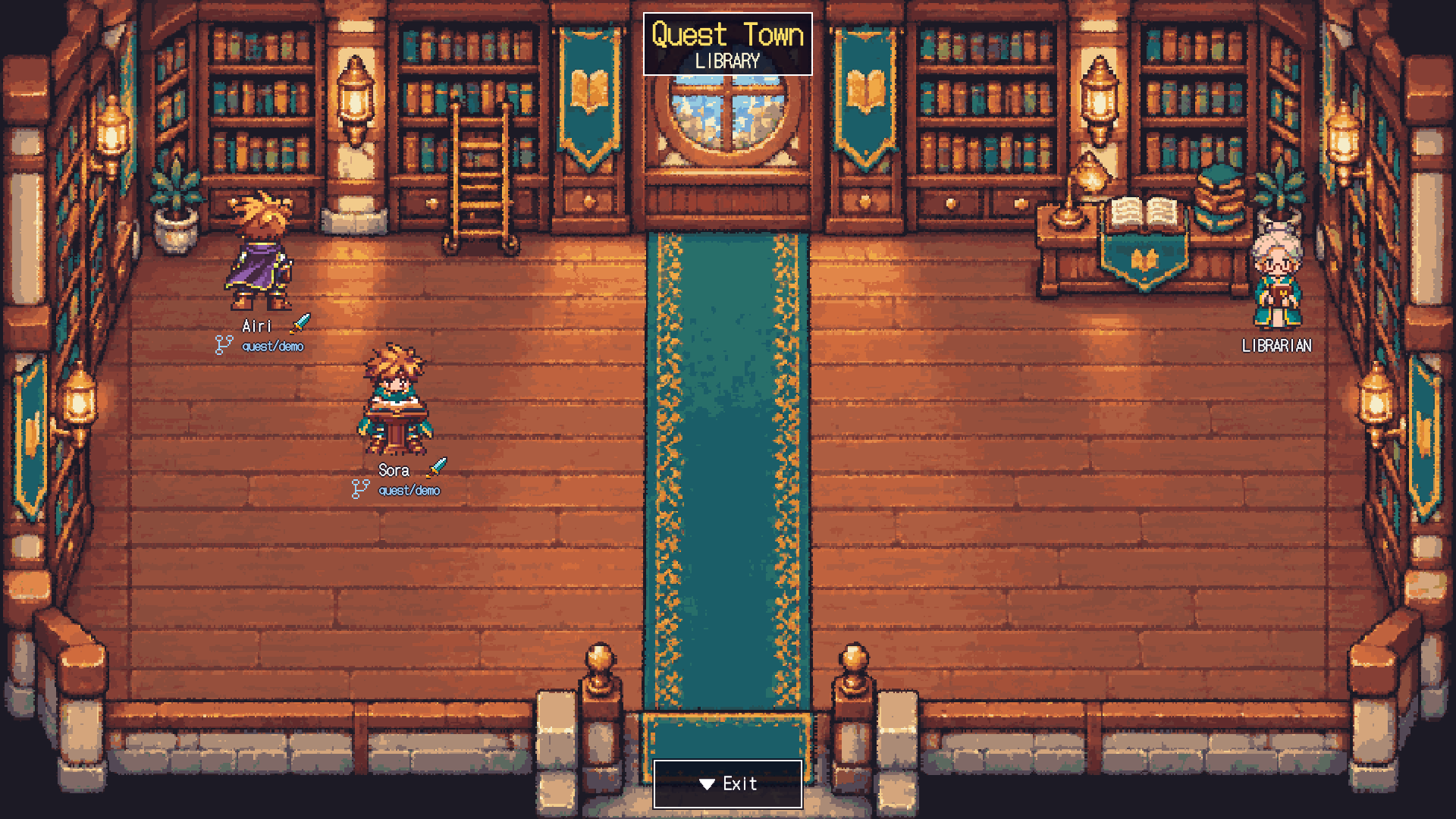 See it in the demo ↗Reading and searching files
Library
A hero that reads opens a book at the lectern; one that searches stands at the shelves. The librarian sits at the back right.
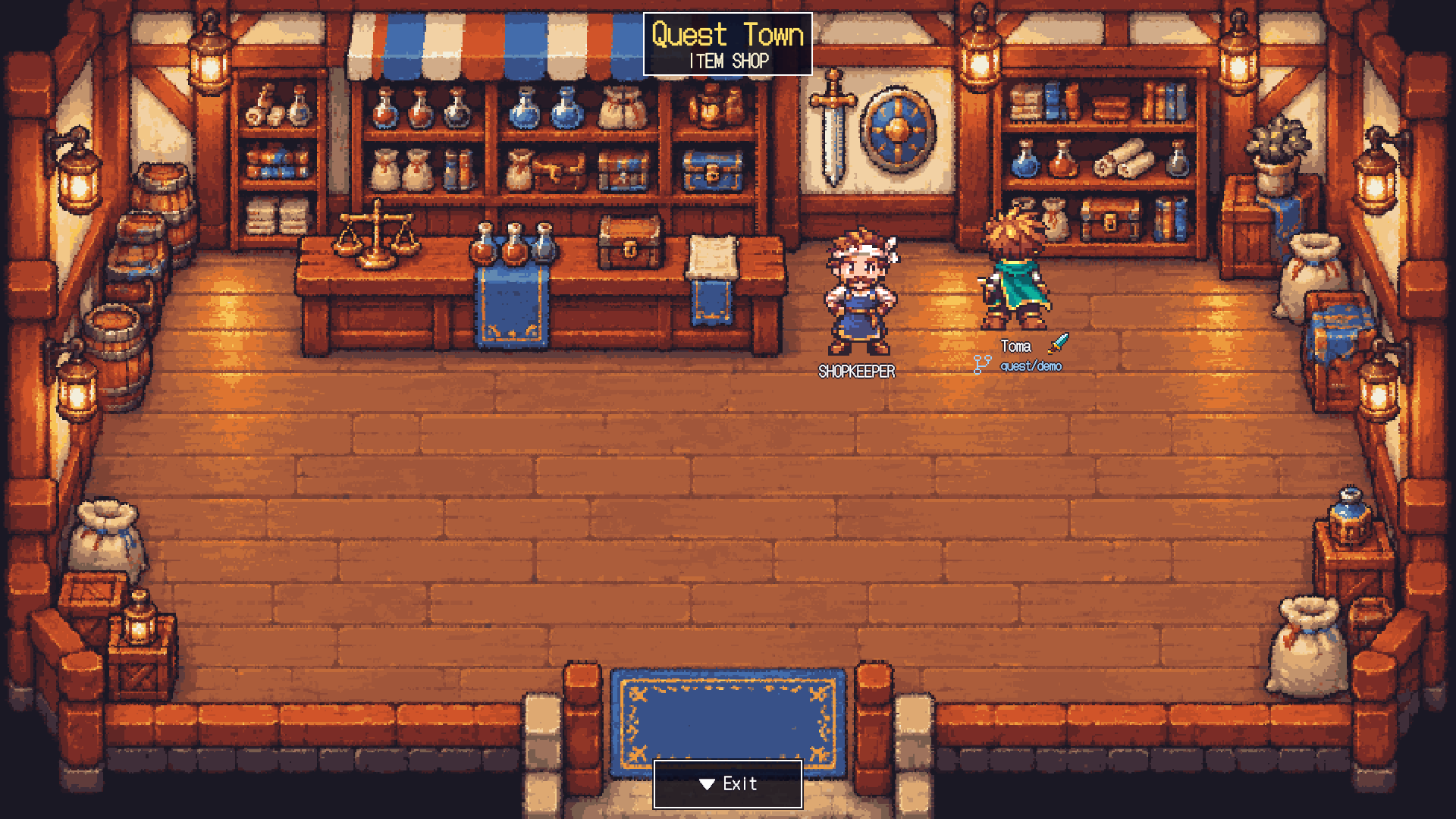 See it in the demo ↗Tools like MCP
Item shop
A hero using other tools browses the shelves of the item shop. The shopkeeper stands beside the counter.
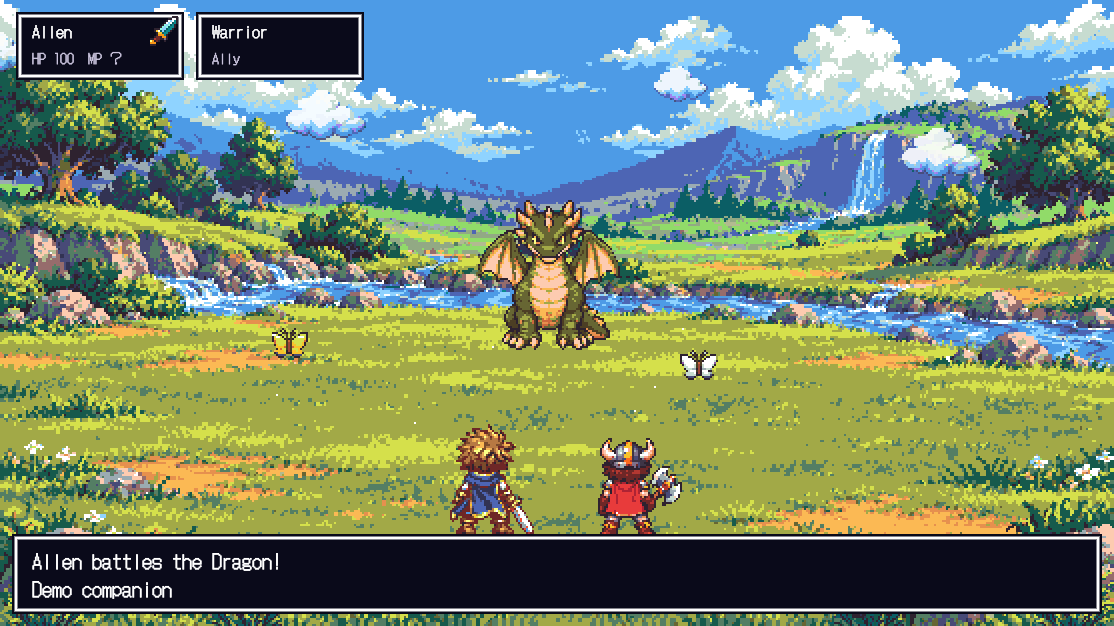 See it in the demo ↗Subagent
Party battle
Big jobs turn into a fight with the Dragon. Failures show up as the enemy's counterattack.
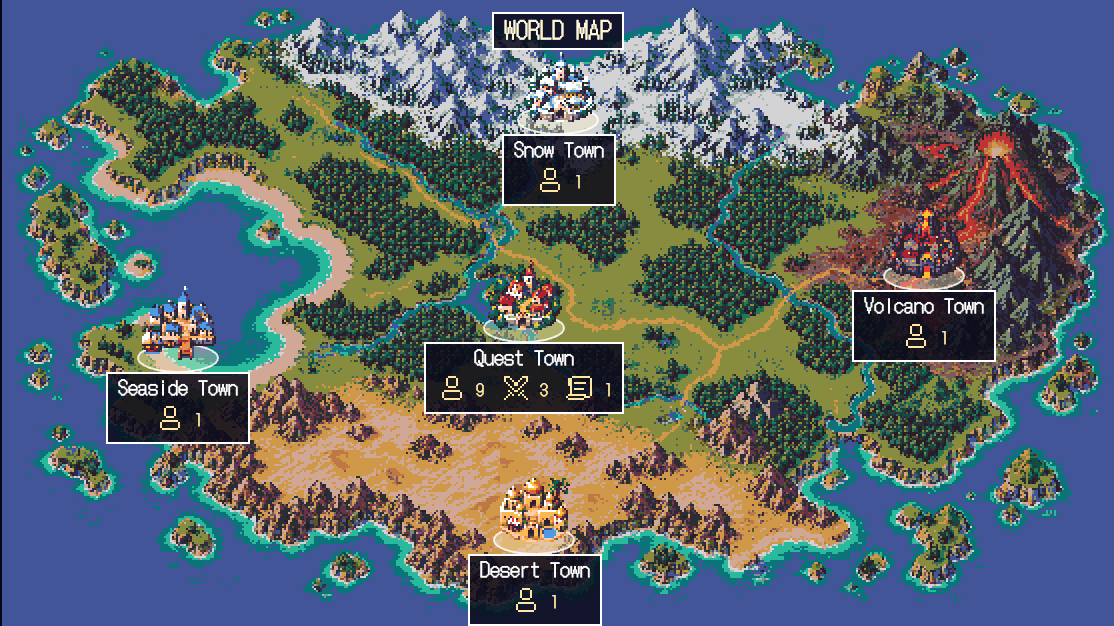 See it in the demo ↗Several projects
World map
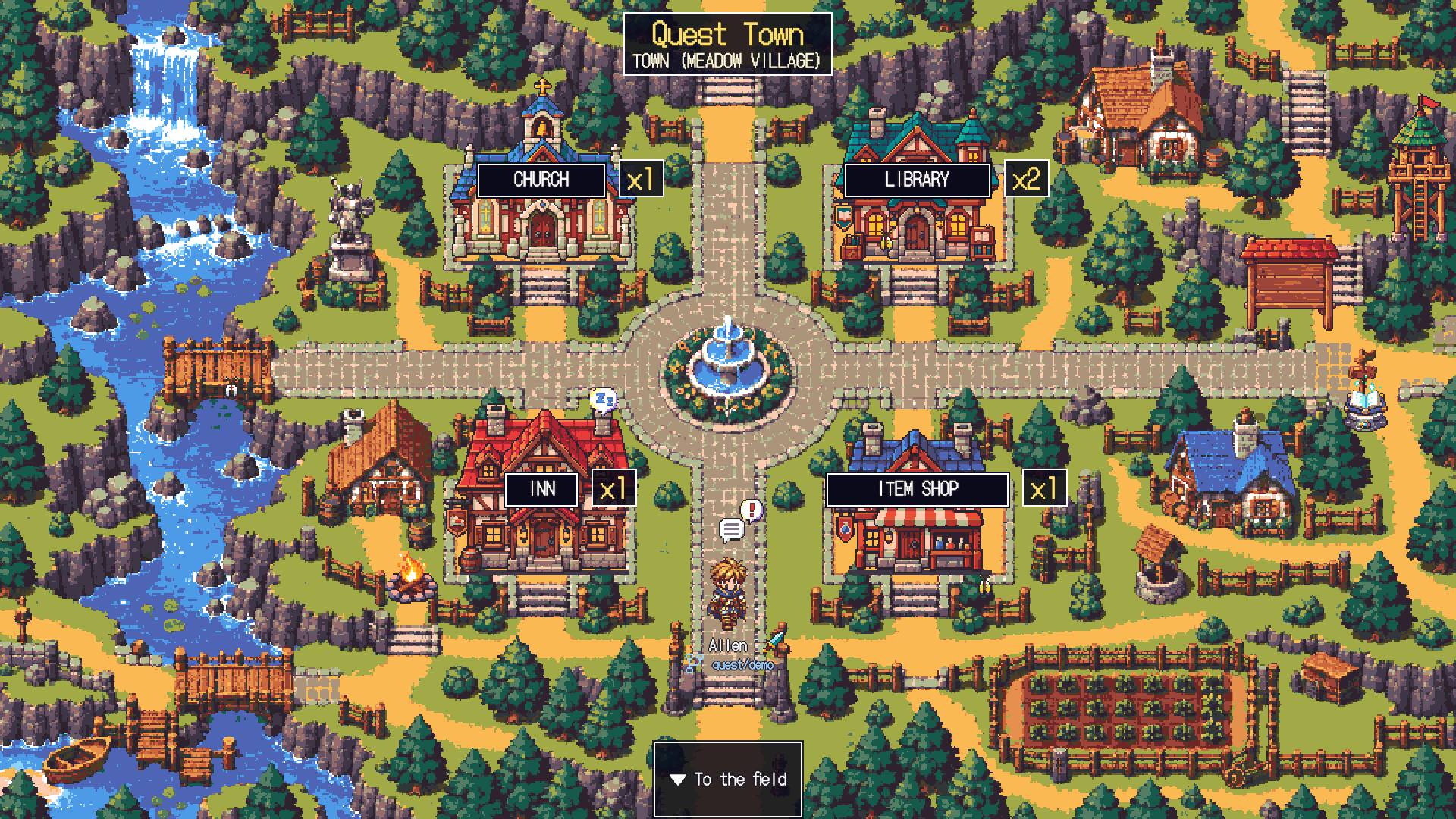
A map of the towns, one per project. The number of working heroes and arrived reports show on each sign.
 See it in the demo ↗Idle
Inn
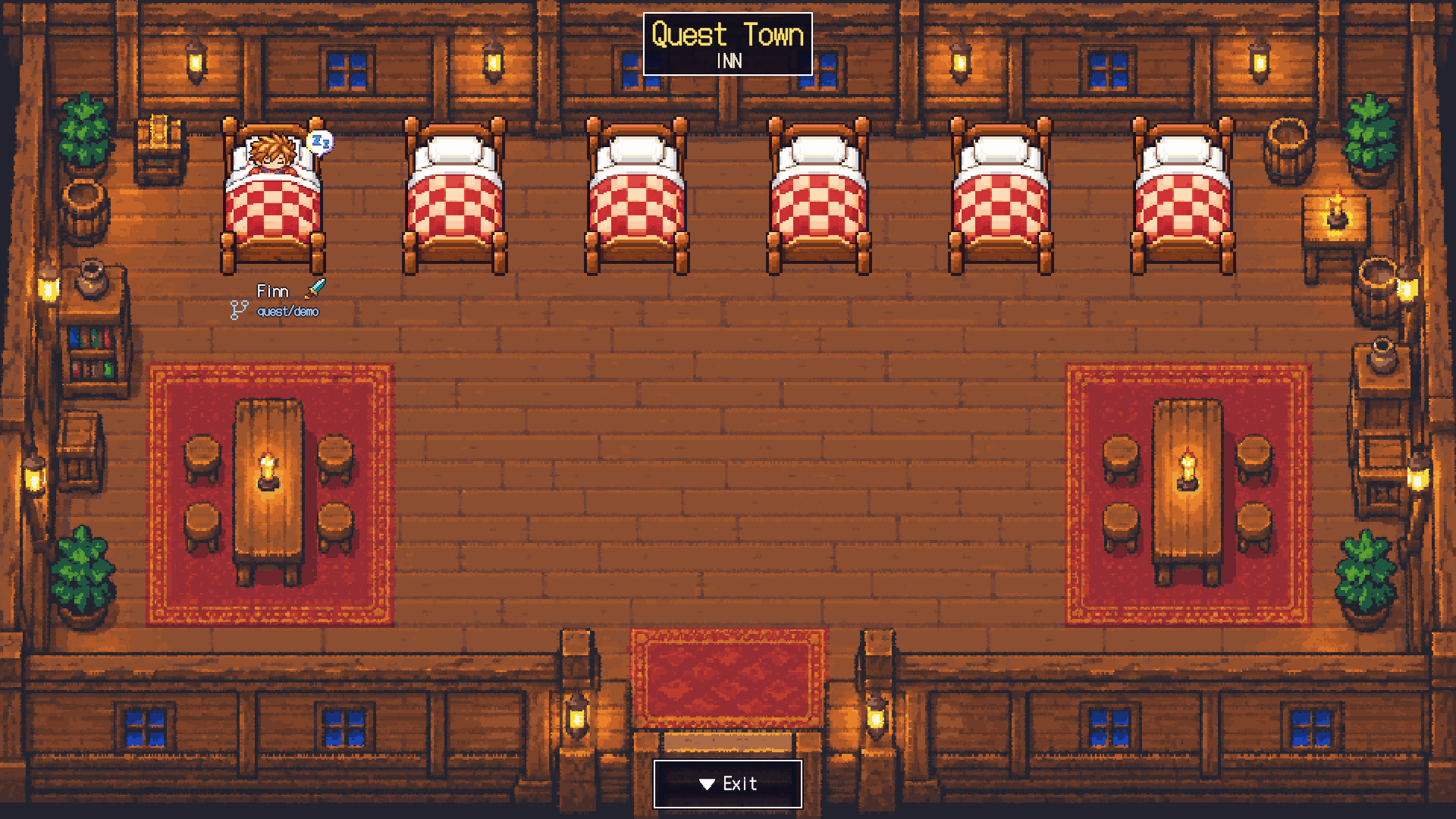
A hero idle for over ten minutes naps in a bed at the inn.
 See it in the demo ↗Conversation tidying
Church
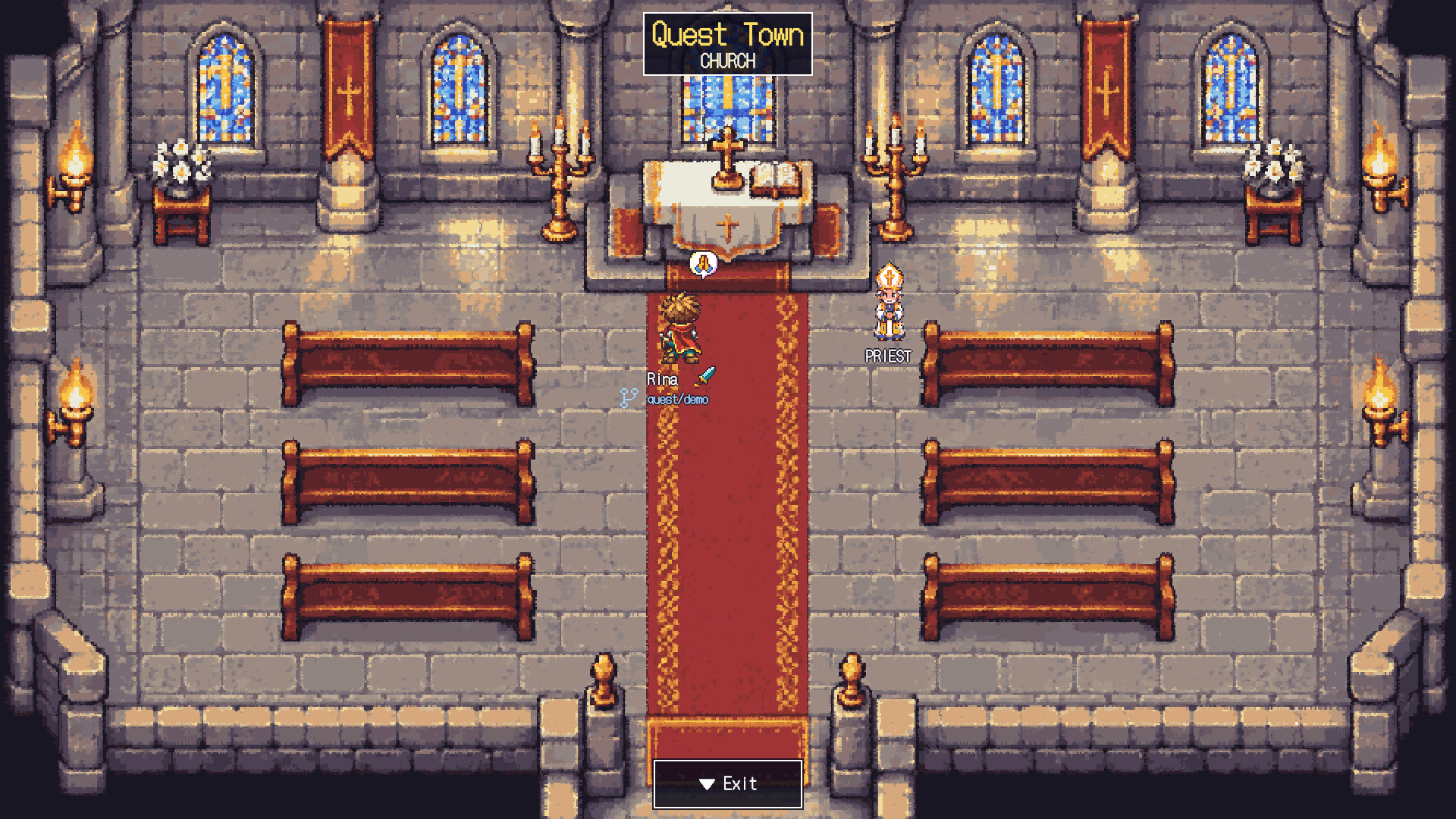
While a long conversation is being tidied, the hero prays at the church.
 See it in the demo ↗Meadow, port, snow, desert, volcano
Five kinds of towns
Each project gets its own town. A town's look doesn't change what the CLI can do.
ROSTER
Meet the residents.
Work becomes monsters, and the ones you rely on become allies. Press a card to see side, back and attack animations. The lore is for fun, but the battlefields and messages follow what the app really does.
MONSTERSMonstersOne opponent per kind of work.
PARTY & TOWNAllies & townsfolkSubagents join as allies.
Slime
A small unfinished feature that sprouts as soon as you write it.
It springs up from nowhere and settles in a corner of the file. Hit it and it vanishes; ignore it and it multiplies. They say it is the TODO comment made flesh.
- In reality
- Running a file-editing tool (Edit, MultiEdit, Write, NotebookEdit)
- Appears
- While the hero is editing a file, it appears in the meadow. Its name tag shows the file being edited.
- How it works
- The hero slashes at the Slime, and a damage number appears each time an edit succeeds. When an edit fails, the Slime counterattacks and the hero's HP drops.
- Messages
- "Hero attacks the 'file'!"
"'file' takes N damage!"
On failure: "Hero took damage! (Edit failed)" - Aside
- If a Warrior finds it, it gets cut down before the review.
Ghost
You can't tell what it is until you run it.
It never shows up on your machine, only in production. Ask for repro steps and it quietly vanishes. Its curses are mostly stack traces.
- In reality
- Running a Bash command that is neither a test nor git/gh
- Appears
- While the hero is running a command, it appears in the night forest. Its name tag shows the start of the command. After 30 seconds of waiting, an hourglass bubble appears.
- How it works
- The hero casts a spell (the command); if it succeeds: "The spell struck true!" If the command fails, the Ghost counterattacks and the hero's HP drops.
- Messages
- "Hero casts a spell! 'command'"
"The spell struck true!"
On failure: "Hero took damage! (Bash failed)" - Aside
- Every time the Priest meets this Ghost, she says "Let's confirm the premises first." The Ghost vanishes, premises and all.
Golem
A trial guardian built by a wizard whose parents were killed by bugs.
Built for revenge, but its parents are long gone. Now it just stands deep in the cave until every test passes. Mix in a flaky test and, oddly, it collapses on its own.
- In reality
- Running a test, type check or lint command (npm test, vitest, pytest, go test, tsc, eslint…)
- Appears
- While the hero is running tests and the like, it appears in the cave. Its name tag shows the start of the command. After a long wait, an hourglass bubble appears.
- How it works
- The hero takes on the trial; if it passes: "Trial complete! Golem defeated!" If it fails, the Golem counterattacks and the hero's HP drops.
- Messages
- "Hero challenges the Golem! 'command'"
"Trial complete! Golem defeated!"
On failure: "Hero took damage! (Bash failed)" - Aside
- The wizard who built the Golem is still somewhere in town, they say. The Mage avoids eye contact.
Dragon
A thousand-year dragon too big to beat alone, waiting on review.
Best faced with allies. It is said to have slept a thousand years on a pile of pull requests. Its fire breath is about the temperature of a deadline. A project that gets scorched is said to have gone up in flames.
- In reality
- Delegating to a subagent (running the Task or Agent tool)
- Appears
- I appear in the meadow while the hero hands work to others. When allies rush in, they line up behind the hero and charge at me. My name tag shows the type of the one the work was handed to.
- How it works
- Each time the hero calls in allies, more faces come to challenge me. When the work is done, I am beaten. If the hero's work fails, my flames hit the hero. Even with no allies at all, the hero comes at me alone.
- Messages
- When the hero gathers allies: "Hero gathers the party!"
(My inner voice: More of them. Coming at me with numbers is like gathering reviewers.)
Whenever an ally joins: "Job (type) joined the party!"
(My inner voice: Warrior, Mage, Thief, Priest. I'll wait until everyone is here.)
When I'm beaten: "The party defeated the Dragon!"
(My inner voice: A completion after a thousand years. I'll sleep again until the next PR.) - Aside
- While the Priest prays "First, a strategy," the Warrior has already been bitten.
Warrior
An all-purpose axe fighter who rushes to the front.
Rushes off before reading the request to the end. Their catchphrase is "Let me just read everything," and by the time they finish, the request has changed. They carry one axe and use it for everything.
- In reality
- Subagent: type general-purpose
- Appears
- When a hero hands work to a subagent, the Warrior rushes to the Dragon fight. In town, they walk behind the hero.
- How it works
- A general-purpose subagent joins the party when it starts and leaves when it ends. When a battle is focused, they line up behind the hero and fight from behind.
- Messages
- "Job (type) joined the party!"
"Job took damage!"
"Job left Hero's party." - Aside
- Cuts down any Slime on sight, before the review.
Mage
Your own mage, whose spells you wrote yourself.
Spent three days on the incantation (the prompt), but wrote it themselves. It contains "absolutely" twelve times, and one of them really is absolute.
- In reality
- Subagent: every type other than Explore, Plan and general-purpose (such as agents you defined yourself)
- Appears
- Joins when work is handed to a dedicated agent. In battle, swings a staff behind the hero.
- How it works
- Joins when any subagent other than those three starts. The type name appears beside the name as it is.
- Messages
- "Job (type) joined the party!"
"Job took damage!"
"Job left Hero's party." - Aside
- Tends to say of the Thief's survey reports, "That's written in my spell."
Thief
A scout who digs up old code nobody knows.
Finds old code nobody has touched by the sound of grep footsteps alone. What gets stolen isn't treasure but the answer to "Where is this function called?" The face covering is so the author of the code they find won't notice.
- In reality
- Subagent: type Explore
- Appears
- Appears when an Explore subagent joins. In the Dragon fight, helps out with a dagger from behind the hero.
- How it works
- Joins when an Explore subagent starts. The status line shows the current action, such as "is searching the archives".
- Messages
- "Job (type) joined the party!"
"Job took damage!"
"Job left Hero's party." - Aside
- Goes to see the Priest's plan first and supports it from behind.
Priest
A strategist who won't move until the prayer (the plan) is done.
The prayer (the plan) is long. Hurry them and you get "Let's confirm the premises first." The prayer lasts until the plan collapses in three seconds of implementation.
- In reality
- Subagent: type Plan
- Appears
- Appears when a Plan subagent joins. In town, walks behind the hero; in battle, lines up from behind.
- How it works
- Joins when a Plan subagent starts. This is a different person from the "Priest of the Church" who lives in the church.
- Messages
- "Job (type) joined the party!"
"Job took damage!"
"Job left Hero's party." - Aside
- Thinks of the Priest of the Church as a colleague, but their posts differ, so they have probably never met.
Hero
Wanders in from the terminal, finishes the job and brings back a report.
Officially a hero, but mostly an errand runner. Asked to "just fix this real quick," they head to the cave before the Demon King's castle. The opponent they fight most is the tests they wrote themselves.
- In reality
- A CLI session (Claude Code, Codex, pi). One session is one hero
- Appears
- When a session starts, they walk in from the town gate and fight while working. They enter the library to read or search files, and the item shop to use tools like MCP. After ten idle minutes they nap at the inn, and when the work is done they set off from town.
- How it works
- Press a hero to open the command window and choose things like Talk, Appraise, Follow or Rest. "Rest" asks for confirmation, then tidies the conversation (/compact). Tunic and cape colors differ by agent.
- Messages
- "Hero arrived in town!"
"Hero took on a new quest!"
"Hero took damage! (X failed)"
"Hero takes a break in town."
"Hero set off on a journey." - Aside
- When allies are called, they trade complaints about the Dragon waiting on review.
Priest of the Church
A priest who quietly has a word for heroes whose conversations ran long.
Whenever a hero rambles, he wants it boiled down to three lines: "So, in short?" He doesn't hear confessions. The only thing he asks is "Why did the context fill up?"
- In reality
- A resident of the town who lives in the church. He guides you to where conversation tidying (/compact) happens; the tidying itself is done by the hero's "Rest"
- Appears
- Always beside the altar in the church. While a hero is tidying the conversation, the church windows glow and the hero prays before the altar.
- How it works
- Press to hear four lines in turn. He doesn't heal or tidy anything himself; he points heroes to "Rest".
- Messages
- "Welcome. Quiet your heart and pray."
"Every traveler needs a little rest."
"Low on MP? Offer a prayer here."
"Choose Rest, brave hero." - Aside
- Considers the Priest a colleague.
Librarian
A librarian whose catchphrase is "Shh."
She remembers every book spine, but won't tell you when a document was last updated. The number of times she says "Shh" is proportional to the number of times a hero has grepped.
- In reality
- A resident of the town who lives in the library. She guides you to where reading and searching files (Read, Grep, Glob, LS) happens; the reading and searching are done by heroes
- Appears
- Stands in the library, by the desk at the back right. A hero that reads opens a book at the lectern; one that searches stands before the shelves. You can look inside from the headcount tag on the library's sign.
- How it works
- Press to hear three lines in turn. Up to three readers and three searchers are drawn; the overflow becomes a "+N more" tag at the top right.
- Messages
- "Shh. This is a library. Quietly, please."
"Heroes who read sit at the desks; those who search stand at the shelves."
"Looking for something? The heroes are searching the shelves." - Aside
- A fellow keeper of quiet places with the Priest of the Church. Her only worry is how loud the Shopkeeper is.
Shopkeeper
A shopkeeper who fills the shelves with MCP tools.
The widest selection in town. But ask which tool does what and you always get "The manual is behind the shelf." The spec is usually behind the shelf.
- In reality
- A resident of the town who lives in the item shop. He guides you to where tools other than the usual ones (such as MCP tools) are used
- Appears
- Stands on the floor beside the counter in the item shop. When a hero uses a tool like MCP, they browse the shelves and hold up a potion.
- How it works
- Press to hear three lines in turn. Up to four browsing heroes are drawn; the overflow becomes a "+N more" tag. The log reads "Hero uses a tool in the item shop. (server name)".
- Messages
- "Welcome! Heroes stop by when they use their tools."
"Potions and gear, all on display. Take your time."
"Another day of heroes getting ready for adventure." - Aside
- Gets told "A little quieter, please" by the Librarian every time.
DEMO
Play it, don't just read it.
No install needed. Tour the towns and try hero commands, reports, quests and change reviews, all in your browser.
Everything in the demo is fictional data. No real CLI is launched, no commands are run and no files are changed. Reload to reset.
COMPARE
Your terminal, made visible.
What gets hard to follow as you add agents is turned into scenery and cards.
| Scene | Terminal only | Yushario |
|---|---|---|
| Who is doing what | Switching between terminals to find out | Town and hero poses show it at a glance |
| Kind of work | Judge by reading logs | Told apart by battlefield and monster |
| Record of work | Scrolls away in scrollback | Quest cards keep the title, owner and checks |
| Checking changes | Open git diff separately | "Appraise" reads the diff as it is |
| Verification results | Track them yourself | Marks for passed, failed, stale, not run and unknown |
| Notifications | You go and look | Permissions, reports, failures and level-ups, with subtle sounds |
| A real terminal | Yes | Yes (you can open the same session) |
| Replaces the agent | — | No. The CLI just keeps running as it is |
FAQ
Stuck? Start here.
What is Yushario? Is it an ADE (agent development environment)?
Yushario is a free, open-source way to watch several coding agents — Claude Code, Codex, pi and more — as a pixel-art RPG town. It doesn't replace your agents: it launches your logged-in CLIs and gathers their progress, change review and adoption into one screen. You can use it as a multi-agent development environment (ADE).
No hero appears in town.
Check that you launched a supported CLI from Yushario's "Embark". A shell does not show a hero. Finish the CLI's login and folder trust prompts in the terminal. Codex needs a /hooks check and a first request.
Where does it run? Where is my data?
It runs only on 127.0.0.1 and is protected by a token that changes on every launch. Quest titles, states and report summaries are stored in a local SQLite database. The text of requests and replies is stored only if you choose "Keep conversations too". Don't expose it through a public proxy or tunnel.
Does Yushario call an AI itself?
No. The work is done by the CLI agent you launched. It never auto-approves permissions either.
I ran the tests but the check never shows as passed.
Check the conditions, the command and where it ran. Complex commands and results that can't be read become unknown. A change after verification can also make the evidence stale.
I got disconnected, or an old URL won't open.
The token changes on every launch. Use the new URL given by the server that is currently running.
What does it cost? Which OSes?
It is free, open source under the MIT license. It supports macOS and Linux and needs Node.js 22.13 or later. Each CLI's terms of use apply on their own.
Can the screen be in English?
You can switch between Japanese and English from Settings → Language in the app. The first time, it follows your browser language.
If it isn't solved?
GitHub Issues. Include your OS, Node and CLI versions, and the steps to reproduce. Remove tokens, conversations, absolute paths and API keys.
More detailsThe guide's FAQ.
Start your adventure.
Just run this command in your project's folder.